


Show, don't tell.
Straight from the notch.
 Wed 9:41 PM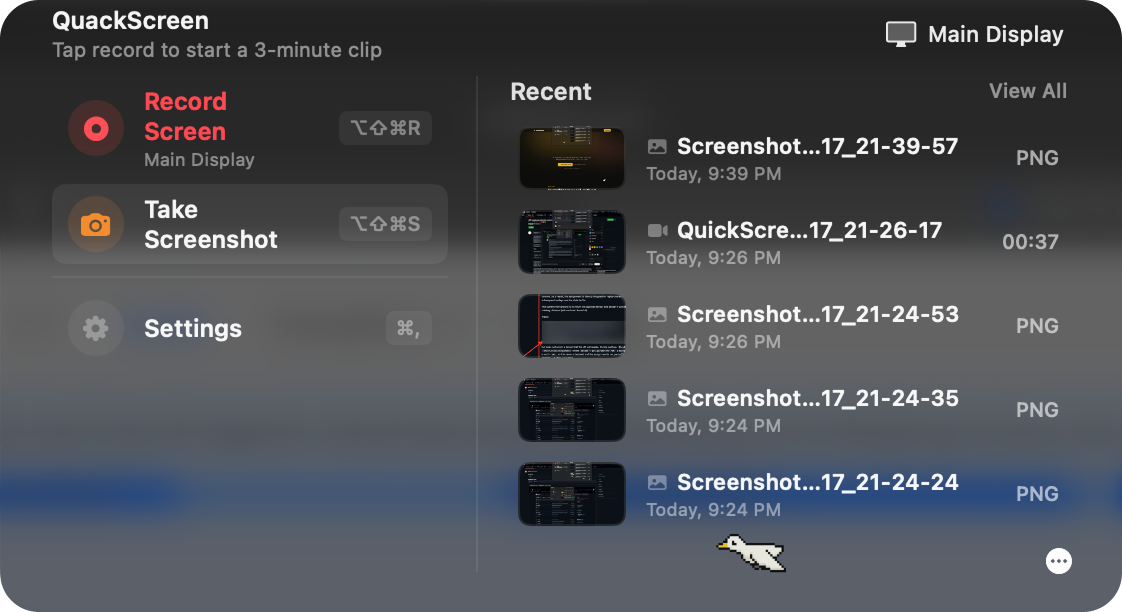
The fastest way to share what you mean. Record a clip or grab a screenshot, then drag it from the notch into Slack, Mail, or any app. No upload, no link, no fuss.
Free to try. macOS 26+ · Apple silicon
What's inside
Everything you need, nothing you don't.
- Short, focused screen recordings (capped at 3 minutes)
- Capture a full display or a single window
- Automatic cursor-following zoom in every clip
- One-click screenshots with an in-app annotation editor: pen, arrow, rectangle, highlight, and blur
- Pick a microphone for narration
- System-wide shortcuts: ⌘⌥⇧R to toggle recording, ⌘⌥⇧S to grab a screenshot
- Drag any recording or screenshot straight from the notch into Slack, Mail, Finder, or any other app — your latest clips live up there, one hover away, no extra steps
See it work
Two seconds in, you'll get it.
Drag straight from the notch
Your latest clip lives in the menu bar. Hover, grab it, drop it into Slack, Mail, Finder — wherever you need it. No upload, no link-passing, no popup.
Screenshots with the annotation editor
One shortcut, one shot. Pen, arrow, rectangle, highlight, and blur — mark it up without leaving the capture flow.
Perfect for
Quick demos. Faster tickets. Fewer meetings.
Built for the moments where typing it out is slower than showing it.
- 01
Bug reports
Repro a glitch in 30 seconds. Drop the clip into Jira, Linear, or GitHub — no upload dance.
- 02
Support tickets
Show, don't tell. End the back-and-forth before it starts.
- 03
Code reviews
Walk through a change without scheduling a call. Drag the clip into the PR thread.
- 04
Async standups
A 90-second screen-walk beats a meeting nobody wanted.
- 05
Onboarding notes
One capture replaces a doc nobody reads. Pin it once, send it forever.
- 06
Customer demos
Annotate, narrate, share. Land the point without a Zoom invite.
Pricing
Pay once. Quack forever.
One license, two Macs, all future updates. No subscriptions.
€10 off when you paste PHLAUNCHJUNE2026 at Stripe checkout.
- One time purchase
Get €10 off — paste this at checkout
PHLAUNCHJUNE2026 The code doesn't auto-apply. On the Stripe page, click "Add promotion code", paste it, and your total drops to €20.
Secure checkout via Stripe
FAQ
Quack-asked questions
Is there a free version? +
You can download QuackScreen and use it for free. A license unlocks watermark-free exports and longer recordings.
How does the license work? +
Buy once, get a license key by email. Paste it into the app on up to two Macs. The license activates instantly and works offline most of the time.
What if I lose my license key? +
Search your inbox for "QuackScreen license" — we send it on purchase. If you still can't find it, email support and we'll resend.
What macOS version do I need? +
macOS 26 (Tahoe) or newer, Apple silicon only. Intel Macs aren't supported.
I have multiple displays — anything special? +
Yes — QuackScreen has to be launched from the screen that has the notch (your MacBook's built-in display). If you start it while your menu bar is on an external display, the popover won't anchor correctly. Move the menu bar back to the notched display and relaunch the app.
Why the duck? +
Because rubber-duck debugging works, but a real rubber duck is hard to keep on your desktop. So we animated one.
Refunds? +
If QuackScreen doesn't do what you expected within 3 days of purchase, reply to the receipt email and we'll refund it. No quack questions asked.